
- This topic has 5 replies, 5 voices, and was last updated 20 years, 3 months ago by
.
Viewing 6 posts - 1 through 6 (of 6 total)
Viewing 6 posts - 1 through 6 (of 6 total)
- You must be logged in to reply to this topic.
Home › Forums › Archives › Instant Messaging › Yahoo! Messenger Support › Change the buddy list background color (Y!BETA)
Yavista. amy_d_g
This works in Yahoo! Messenger 7.0 (BETA) only.
You can now change the background color of the buddy list. (No you still can’t add an image!)
For the skin you are using, look inside the skin folder, located in C:Program FilesYahoo!SharedGraphics. Find the skin.xml file, and open it using notepad or wordpad. Find this line:
 UnSaKreD
About Time!
 Eagle_Kiwi
I second that, Unsakred!
That was the only thing left that I really kinda hated about my YM7 – now customised easily.
Thanks for a MARVELLOUS tip there, Amy 🙂
Though I found I had no “skin.xml” file as such, I found that line in the huntergreen.xml file I had – which was a new skin I installed there recently. Your change worked great.
Hmmmmm, and I MUST keep my curious little weasel eyes off all the OTHER mysterious but juicy-looking parameters within that file .
amy_d_gLol, sorry I should’ve been clearer… it isn’t “skin.xml”, it’s
(name of whatever skin you want to change).xml
:pAnd the xml can be fun, once you figure it out… thats half of making a new skin!
 ToeBee
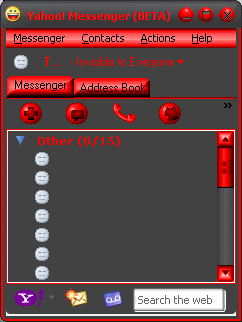
Just to add a little bit to this. You will notice that the color around the smiley icons don’t always match the background color.
example

A quik fix to this is just pic the skin you want to use then reboot messenger
example
 Yavista
You can use my xml / skin maker to edit an xml file Amy (or just get a hex value) – I’m in the process of getting it to apply effects to all the bitmaps in one go too. eg. Invert, Solarize, etc….
*At the moment, It works best with the default xml that’s file built into it.
http://www.yavista.net