
Home › Forums › Archives › Computer Support › Computer Support Discussion › C drive overload, help please
- This topic has 11 replies, 6 voices, and was last updated 21 years, 6 months ago by
Tiger_lily.
-
AuthorPosts
-
March 24, 2005 at 6:55 pm #17537
Tiger_lily
MemberHi,
As some of you have read I had problems with my yahoo ID being stolen, well when that was stolen I took off my messenger, thinking that was the problem and reloaded it but it wouldn’t reload, it said not enough space. I looked at My Computer and noticed that my C Drive was almost completely full…..I’m using 13.0 GB and there is 18.6 total GB on my computer……….
The day before I checked it cause I downloaded some music files and it was fine, the whole thing was free space, so I know the music files aren’t the problem. I ran AVG, Microsoft Antispayware, adaware and spybot thinking I had some virus but they all come back clean…..anyone have any clues as to why I’m using so much disk space?? I can’t download anything…….I need my yahoo messenger:crying:March 24, 2005 at 7:31 pm #117425Kudo
ParticipantClean your PC you probably have a lot of Temp files and cache plus other stuff taking up space.
March 24, 2005 at 8:45 pm #117429Member*LOL* if it was something that simple I wouldn’t have a problem…………I tried that……there is basically nothing on my computer. Just a few downloaded music files. Other than that, it’s just the basic stuff thats always been there….but still it’s full…….I wish I could figure out whats wrong.:confused:
March 24, 2005 at 9:02 pm #117426SS_AntiHacker
MemberDear Tiger_lily,
You said that you only used up about 13 GB, and you said you have a total of about 18 GB. That is way more enough space to install a lot more things to it. You might want to try scanning your hard drive for bad sectors. Right-click your hard drive, select properties, select the tools tab, selects “check now”, check both options and click on start.
Please reply if you still have problems =)
Goodluck !!!
March 24, 2005 at 9:23 pm #117421Someguy03
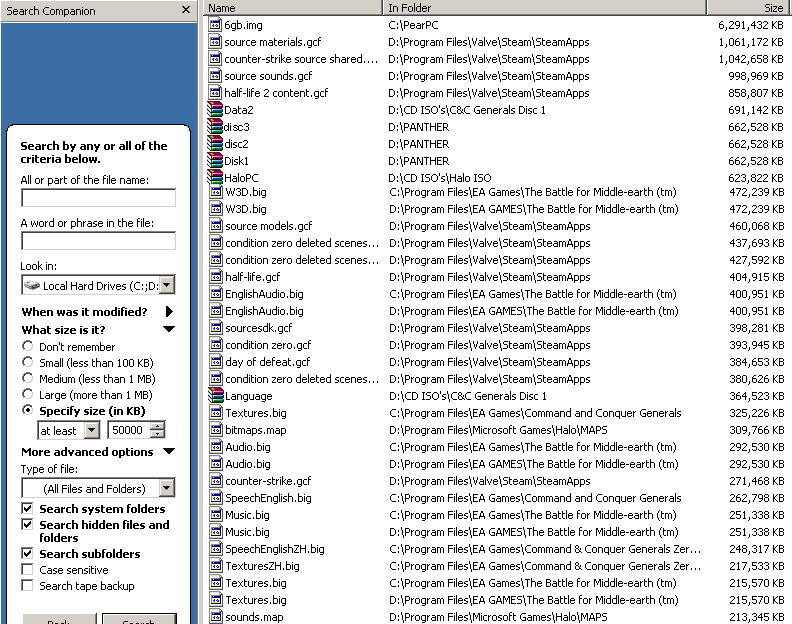
MemberThere could be large files on your computer that you don’t know about (REMEMBER TO EMPTY YOUR RECYCLE BIN). Here is a good way to find large files automatically using Window’s built in search tool:
1. Go to your start menu and click on Search
2. It should ask “What do you want to search for”, and you should click “All files and folders”
3. Where it says “All or part of the file name:”, leave it blank
4. Go to where it says “Look in:” and set it to “My Computer”
5. Click the arrow next to “What size is it” to expand the menu
6. Go down to the last option in the expanded menu, “Specify Size (KB):”, and select “At least” from the drop down. Then next to that, type size of the file you want to search for (in KB form). For example, if you want the search to find you all files that are 50 MB and bigger, you would type in “50000” (since 1000KB = 1MB), and it will automatically search for all files that are bigger than 48.8 MB
7. Below that, click the arrow next to “More Advanced Options” to expand the menu
8. Check these boxes: “Search system folders”, “Search hidden files and folders”, “Search subfolders”
9. Then go down and click search to start it (remember that the box where you type in what you want to look for needs to be blank)
This method will automatically find all files on your computer that are bigger than the size you specify. It’s a good way to find old installation files or videos you dont want anymore:
 March 24, 2005 at 10:59 pm #117423
EEDOK
Memberyou might wanna edit the warez out of that image..
March 25, 2005 at 3:40 am #117422MemberEEDOK wrote:you might wanna edit the warez out of that image..
Heh, you might be surpised to know that they are NOT “warez”. I have all of the game and program installations that I use alot on my secondary hard drive. Why is this? Because I format my main HD extremely often and hate having to go through things like Command and Conquer Generals + its expansion pack (total of 4 discs), or Half-Life 2 (total of 5 discs). And yes, I do own OS X Panther. My brother works in a video editing class as a high school senior and was given permission to keep a G5 at his house for the year because his class is doing a DVD “yearbook”. Along with the G5, he was given Panther. =)March 25, 2005 at 8:20 pm #117430MemberOkay I did as antihacker and someguy03 said to do, and it’s still the same, I unloaded anything I don’t need: my music files, deleted the recycle bin, cleared cookies, cleared the temp folders, I went through files on the c drive and can’t find anything that would take up so much space. I tried downloading yahoo messenger again and it still says there is not enough disk space………I have no idea whats going wrong with this thing……any other ideas?
March 25, 2005 at 9:08 pm #117424Tigerblade
Participantthis may not help clear up much space, but you can try to defragment your hard drive…. i dont know how much that would help, but its something.
Quote:I’m using 13.0 GB and there is 18.6 total GB on my computer…..I tried downloading yahoo messenger again and it still says there is not enough disk space
yahoo wants 5 gig of space?? how is there not enough room on the disk if you still have 5 gb available? i realize you dont know yet how that much space is being used in the first place, but that should leave more than enough for any program…
March 25, 2005 at 9:38 pm #117427MemberTiger_lily, could you post up a screen-shot of your hard-drive’s properties? (Righ-click hard-drive, select properties, press Print Screen button on your keyboard, paste in Paint, etc.).
2ndly, try to install any software while in Safe-Mode (I’m just trying to narrow down on problems)…if it work or not, please let me know.
March 25, 2005 at 10:39 pm #117431MemberWell I’m having trouble with the screenshot thing……my print screen button doesn’t seem to work or something…….And I’m not sure how to get into safe mode:o
March 25, 2005 at 11:36 pm #117428MemberUhm…hihi, anyway…to get in Safe Mode, press F8 before Windows start and choose Safe Mode without Networking.
-
AuthorPosts
- You must be logged in to reply to this topic.