
- This topic has 2 replies, 3 voices, and was last updated 20 years, 7 months ago by
.
Viewing 3 posts - 1 through 3 (of 3 total)

Viewing 3 posts - 1 through 3 (of 3 total)
- You must be logged in to reply to this topic.
Home › Forums › Archives › Instant Messaging › AIM Support › DeadAIM – Changing Smileys
shooptek. TheHunter
Well, here we go, my first topic/post. I’ll feel like a real idiot if this is already posted some place on the forum/site. Anyway, I’m not sure but this might only apply to DeadAIM users. I think it was about a year ago, AOL released a ton of AIM smileys. A small list of those smileys can be found HERE. You can take those hash codes and replace them with your current smiley hash.
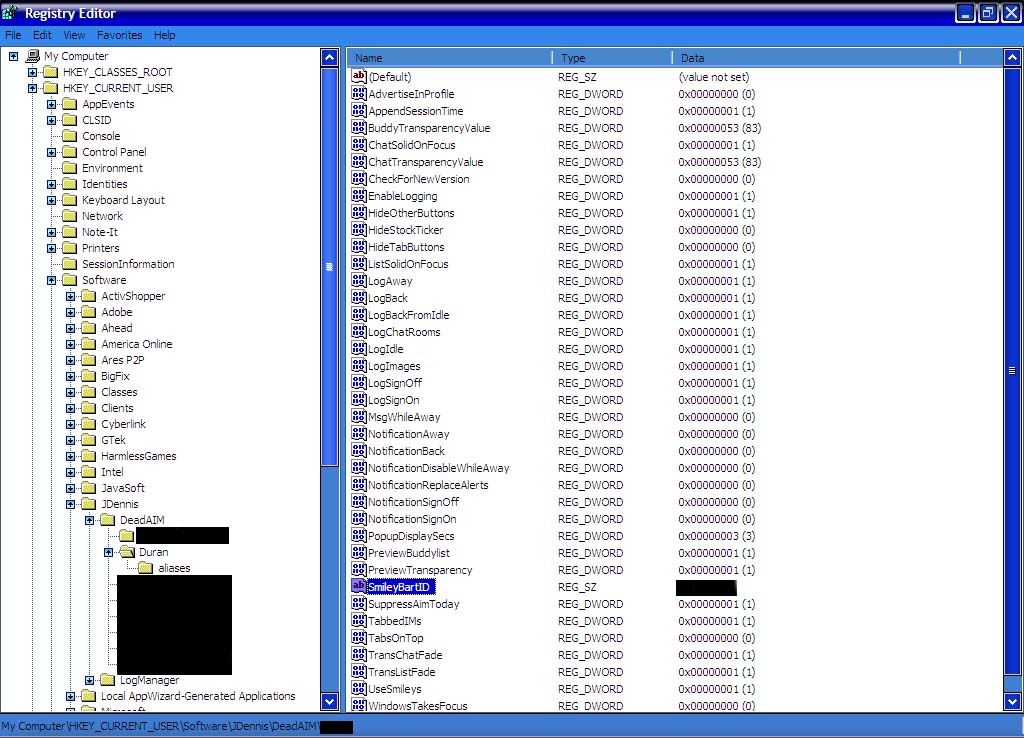
Just follow these directions: Start > Run > Regedit > HKEY_CURRENT_USER > Software > JDennis > “Your Screen Name” > Double click “SmileyBartID” > Replace hash code
Here is a picture of my own personal smileys. If there are any problems or questions, feel free to contact me through private messages. 🙂
 shooptek
Hey I have followed your steps, but I dont get what I am suposed to type into the space that I get when I click on SmileyBartID. I want to add my own smiley, is that possible or not?
 atpgod
I believe it’s the ID of the smiley set… http://www.smileyspot.com/?p=smileysets should give you more information on the smiley sets.