
Home › Forums › Archives › Computer Support › Computer Support Discussion › Internet Explorer 7
- This topic has 29 replies, 19 voices, and was last updated 19 years, 7 months ago by
simsim.
-
AuthorPosts
-
December 30, 2006 at 10:03 pm #153520
confused_amanda
Memberi downloaded IE7 and whenever i start up my computer i get this message…
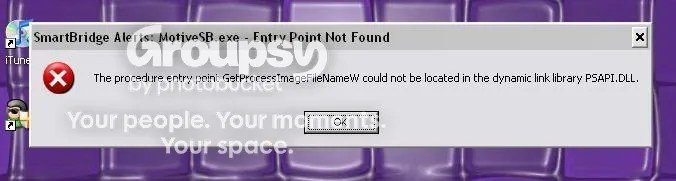
I don’t think that it can be anything else as that was the only thing i did differently that day. Can any one help or know what it means as it’s kind of annoying?!
December 30, 2006 at 11:01 pm #153525Spike
MemberThat program probably used some stuff that, when you upgraded to IE7, wouldn’t work anymore. The only thing to do is uninstall the program (and maybe reinstall it) or downgrade to IE6 (which I HIGHLY don’t recommend).
December 31, 2006 at 2:21 am #153528DrBroccoli
Participant@confused_amanda 212574 wrote:
i downloaded IE7 and whenever i start up my computer i get this message…
I don’t think that it can be anything else as that was the only thing i did differently that day. Can any one help or know what it means as it’s kind of annoying?!
You wouldn’t happen to have Verizon/AT&T/SBC DSL? It’s a service used by them to allow users to submit files for support, unnecessary if you ask me and you could disable it if you wish.
December 31, 2006 at 9:21 am #153521MemberShadowdogMU;212586 wrote:You wouldn’t happen to have Verizon/AT&T/SBC DSL? It’s a service used by them to allow users to submit files for support, unnecessary if you ask me and you could disable it if you wish.How would i disable this part? I have version 7.0.5730.11
Also, when i go to the uninstall program list, IE isn’t there… would it be under a different name or would i just have to search for it in my folders?
(sorry for being a pain!)
December 31, 2006 at 1:37 pm #153536Eagle_Kiwi
MemberHi Amanda.
I agree with Spike, that uninstalling IE7 is probably best only as a last resort, but anyway, mine is in Add/Remove Programs (in Control Panel) under “W” – Windows Internet Explorer 7 !!
(Don’t worry, took me a bit of searching too, under I, then M, etc etc 😉 )Let’s know if you still can’t find yours there.
December 31, 2006 at 2:26 pm #153529Participant@confused_amanda 212590 wrote:
How would i disable this part? I have version 7.0.5730.11
Also, when i go to the uninstall program list, IE isn’t there… would it be under a different name or would i just have to search for it in my folders?
(sorry for being a pain!)
I would assume it’s being ran as a service or on startup, try this and see if it works:
Start > Run > type in “msconfig” (no quotes)> Start-up tab > now look for and disable The Motive SmartBridge, or it should be close to that.
December 31, 2006 at 5:37 pm #153522MemberShadowdogMU;212599 wrote:I would assume it’s being ran as a service or on startup, try this and see if it works:Start > Run > type in “msconfig” (no quotes)> Start-up tab > now look for and disable The Motive SmartBridge, or it should be close to that.
ok i did that and i found a Motive SB which i assume is the same thing, i unticked it restarted and now i get this…which i dont really understand so wondered if anyone could help with that.
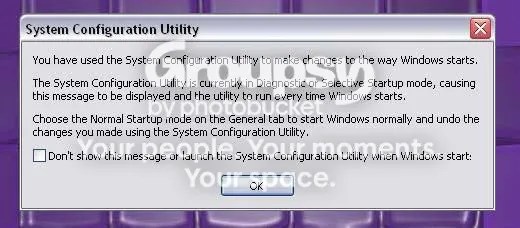
(the original problem has gone away)
December 31, 2006 at 6:29 pm #153526MemberIf your problem has gone away, then don’t worry about it unless it comes back again, simple as that.
December 31, 2006 at 7:04 pm #153531Nessa
Participantconfused_amanda;212608 wrote:ok i did that and i found a Motive SB which i assume is the same thing, i unticked it restarted and now i get this…which i dont really understand so wondered if anyone could help with that.(picture)
(the original problem has gone away)
This will appear anytime you change something in the Startup that way. So just check off the box to not show you that message again and it’ll be gone! Of course it will show up if you ever make any changes there again, but you can always just do the same again!
(Because if you don’t put a check in the box, the message will appear everytime you start your computer)
Hope this helps! 🙂 And glad you solved your problem.
December 31, 2006 at 8:46 pm #153523Memberhatedjealousy;212614 wrote:This will appear anytime you change something in the Startup that way. So just check off the box to not show you that message again and it’ll be gone! Of course it will show up if you ever make any changes there again, but you can always just do the same again!(Because if you don’t put a check in the box, the message will appear everytime you start your computer)
Hope this helps! 🙂 And glad you solved your problem.
Yeah… can you tell i’m not great with computers!? Thanks a lot :confused:
January 29, 2007 at 9:00 pm #153546razzle51
MemberI had problems with it too so I am stick ing with IE6
February 13, 2007 at 4:08 am #153538missy-12
MemberI downloaded Windows Live One Care installed it and then it called for me to installe IE7 boy what a mistake! slowed down the computer A LOT!! uninstalled IE7 and back to “almost” normal. However, now Window Live one care keeps asking me to install IE7! go figure
February 23, 2007 at 8:31 pm #153547simsim
MemberI have interner explorer 7, and it was working pretty well but i have a problem now and i wasn’t sure where to post this message.. any website that requires some form of logging in such as hotmail, yahoo mail (although it works sometimes), facebook, and even msn messenger don’t work. it brings the main page to sign in but once you press enter or sign in it brings an error page. i’m not very good at computers but apparently it’s some form of proxy problem or something..This problem happened before on this same computer but all technicians and everyone told me the only solution was to reformat the computer, which as you can see, has the same problem about 6 months later. Yahoo mail was the only site which was working with me and 2 minutes ago it stopped working, but once i reset the internet settings for some reason it was the only website that started allowing me to check my mail. When I had the problem previously, none of these websites were working, but i’m pretty sure it’s the same problem, i dont know what exactly the problem is though…any ideas?
February 24, 2007 at 7:04 am #153539Philip
Moderatorsimsim:
In IE7 click on Tools > Internet Options > Connections. Click on LAN Settings and make sure everything is unchecked. Click OK and restart IE7. Please post back if you’re still having trouble.
February 24, 2007 at 7:05 am #153540Moderatormissy-12;214830 wrote:I downloaded Windows Live One Care installed it and then it called for me to installe IE7 boy what a mistake! slowed down the computer A LOT!! uninstalled IE7 and back to “almost” normal. However, now Window Live one care keeps asking me to install IE7! go figureUninstall Windows Live One Care. See whether IE7 behaves better without it.
-
AuthorPosts
- You must be logged in to reply to this topic.