

Forum Replies Created
-
AuthorPosts
-
Jeff Hester
KeymasterNope. You’ll need to have access to the email linked to your AIM account in order to reset your password.
If you haven’t used the account in two years, does it really matter? Just setup a new account.
KeymasterLet me look into it this weekend. I didn’t realize they were broken!
KeymasterThe .m2ts is a container file format for multiplexing audio, video and other streams which is commonly used for high definition video on Blu-ray Disc and AVCHD and Sony’s camcorders. But it is really a question, if you want to enjoy the .m2ts files on iPhone, iPod, Sansa, Archos, etc and share them on Youtube, my space.
Well, 4Easysoft M2TS Converter can help you easily handle the .m2ts files.
Key features of this converter:
a. Convert M2TS files to MKV, AVI, WMV, MP4 and more
b. Convert TS, MTS, TS, MOD, TOD, MOV, FLV, WMV, HD MP4, etc
c. Added audio converter and audio extractor
d. Advanced video editing – Merge, Effect, Trim, Crop and SnapshotThe followings are the detailed gudie:
Preparation: Download and install 4Easysoft M2TS Converter
Step 1: Add files
Click “Add File” button to load the video files that you want to convert.
Step 2: Set output settings
You can choose the output format from the profiles drop-down lsit.
You can set Encoder, Bitrate, Channels, Resolution and so on by clicking “setting” button.
Step 3: Start conversion.
Click “Start” to begin the conversion with high output quality and converting speed.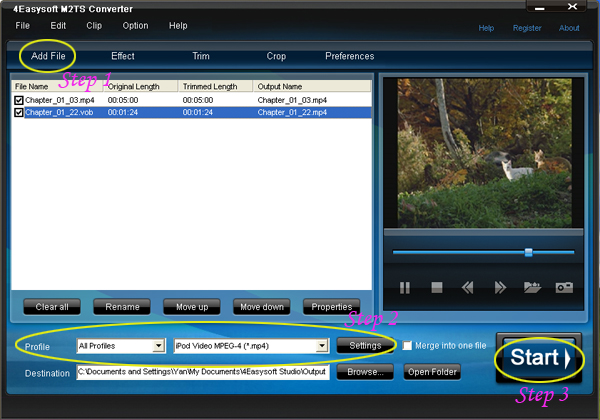
Editing Tips:
Tip 1:Effect
Click “Effect” button, you can set the video Brightness, Contrast, Saturation and check Deinterlacing to help you optimize the video effect.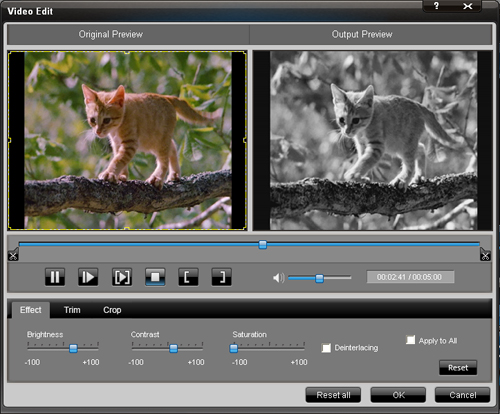
Tip 2:Trim
Click “Trim” button ,you can pick up any part of your videos your videos by dragging the slider bar; clicking “Start Time” and “End Time” button or setting the values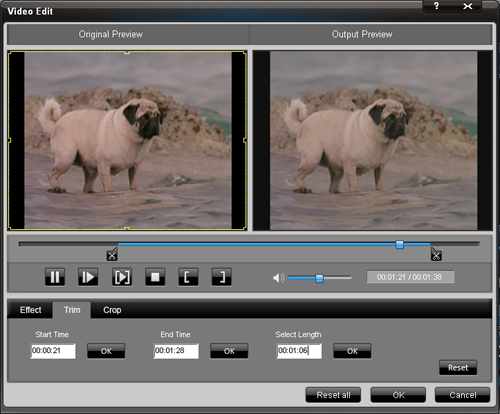
Tip 3.Crop
Click “Crop” button, you can set the frame size by selectting a crop mode; adjusting the crop frame; or setting the crop values.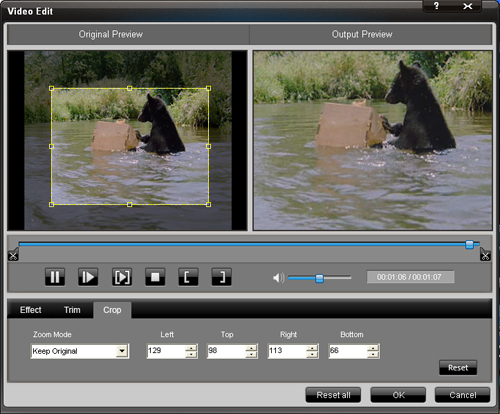
Tip 4. Preference
Click the “Preference” button you can select the output destination, the Snapshot foler, the format of the snapshot image,etc.
Tip 5.Snapshot
Just click the “Snapshot” button you can save any image you like when previewing the viedeo and click the “Open” button next to “Snapshot” button, you can open the image.
Tip 6.Merge
If you want to merge several files into one file you can choose them and click the “Merge into one file” to do it.
Try now!Related tools:
4Easysoft MTS Converter:
It is poised to convert MTS video to AVI, MPEG, MP4, WMV and all popular video formats . And you can also convert video, like TS, M2TS, TS, MOD, TOD, MOV, FLV, WMV, HD MP4, etc to what you need video formats in fastest and most efficient way.
4Easysoft TS Converter:
This is an outstanding TS Video Converter, TS Video Creator, and TS file editor, so it owns the ability to convert TS to other videos, create TS file from all popular videos, and edit your TS file easily.Keymaster@detn8r 247255 wrote:
Happy Birthday, Jeff
@patndoris 247257 wrote:
Indeed! Happy birthday Jeff! *clears throat*
(imagine a slightly catchy tune here)
Happy birthday to you,
Happy birthday to you,
Happy birthday to our illustrious leader Jeeeeeeffff,
Happy birthday to you.Ok, OK! I’ll stop singing. Enjoy your special day!
@Nessa 247266 wrote:
Happy Birthday Jeff!
@Philip 247271 wrote:
Happy Birthday, Jeff. Now where did that BBB birthday song go?
@Nessa 247274 wrote:
I don’t know but we can always summon Heather to sing it! lol
Thanks everyone! Had a great birthday and genuinely appreciate all the birthday wishes!
KeymasterI had the same issue as Marc… I *couldn’t* get the 5.0 version, at least not from the Google Chrome beta channel. I tried on both Windows 7 and XP with the same result. I’m curious as to why and how you DID get it there. Weird.
Keymaster@patndoris 247202 wrote:
I re-installed Beta Chrome from the official download and got the latest dev version number 5.0.356.2.
I was briefly able to get to a post but as soon as I started to type in the reply box , AW SNAP! I refreshed, it came back up. I tried to type and before I could get done….Aw Snap again. After that…unable to get anything to load on a post page. Back to IE now.
I did test other suites with heavy use of Flash and Java and had no issues. I also tested going to the Trillian forums to be sure I could actually access posts elsewhere – again no problem. My guess is a script of some sort that doesn’t want to play nice with the latest Chrome build. That doesn’t help narrow it down much does it?
Did you click the Reply button, or use the Quick Reply form? Does it work differently if you use the Reply button? If the problem only occurs with the Quick Reply form, that helps me narrow down the problem, as that’s currently configured to use AJAX calls.
KeymasterThere were some issues with the forums, but these should be resolved. I’m replying right now using Google Chrome on Mac OSX.
What version of Chrome and what operating system are you running? What error do you get?
KeymasterWhat is Sky? :p
KeymasterI think it’s fixed. I HOPE it’s fixed. I’m a bit unnerved, since I never had a problem accessing the forums. Really sneaky hack!
KeymasterDone. Hope it helps!
Keymaster@bluemartin 247088 wrote:
Thanks for such a detailed answer. I tried to see what video card I have from my device manager but could not find any entry for that. There is one called display adapter. Is it the same thing?
Yes, that’s it. What OS are you running? What kind of computer do you have (make/model)?
Keymaster@bluemartin 247089 wrote:
Here is a tutorial that helped me a lot regarding putting video on iPhone : http://www.easysolution.org.
Your link isn’t working.
As for putting video on an iPhone, I’m going to take a wild guess and assume you’re talking about ripping a DVD or movie to your iPhone, right? If so, there’s only one tool you need, and it’s 100% free. It’s called Handbrake and there are versions for Mac OSX, Linux and Windows. It will rip and encode DVDs to any number of formats.
Personally, I can’t tell you how fed up I get by the despicable practices of some of the commercial DVD encoding software companies that hire people to post their BS crap on as many forums as they can in the “guise” of tutorials. Nothing pisses me off more. Fortunately, nothing brings me greater pleasure than exercising the “one click, ban-and-spam” tool to kick those worthless bastards off the site.
KeymasterThanks for the post, Doris!
Out of curiosity, what are considered “invalid characters?”
KeymasterVery cool! There are a couple parts to this. First, you need a weatherproof camera. Second, you need some way of connecting that camera to the Internet. I haven’t done this myself, but can give you some idea of where to start.
The easy way to setup a surfcam:
If there is a business within view of the surf you want to capture, ask them if you can put your camera somewhere on their building. If it works out where you could put one indoors with a view from a window, that could save you from having to buy a weatherproof camera. And there’s a chance they’ll have an Internet connection you can tap into, maybe in exchange for some acknowledgement on your site?
Setting up a surfcam: The Hard Way
Now let’s assume that you’re in a remote area and there are no businesses or buildings nearby. You get your weather proof camera and mount it in a tree. You still need some way of communicating back to the Internet. Wifi is out of the question, since we’ve already established that you’re out of range. Most likely cellular data will be your best bet, preferably 3G.
Oh yeah, and you’ll need a power source! And a fat wallet. 😉
There’s a good resource to all the products available, including options that will meet your needs at http://www.webcamstore.com/
Keymasterbluemartin, you can absolutely do this. I highly recommend it!
Most people I know who have worked with dual screens for any length of time become addicted to the extra screen real estate. It makes multitasking so much easier.
How do you connect to monitors to one PC?
There are a couple of techniques, and it will depend on the kind of video card you have. Many of the better video cards are “dual head” cards with connections for two monitors. You simply check the connections on the back of your PC and see if you’ve got two connections. Then in Windows, you can configure your video properties to assign the primary and secondary monitor, which side which is on, and and even choose different resolutions for each monitor (LCDs are optimized for ONE resolution, which varies by model).
If you don’t have a dual-head graphic card, you may be able to add a second video card. This can be a little trickier. I’ve done this by using two of the same brand video card (i.e. nVidia).
Do you know what video card you’ve currently got? Tell us the brand and model, and we can help you figure out what kind of configuration it will support.
-
AuthorPosts